
Inside the Delta Robot Control Panel: Four Servo Drives and a Mini PC
By Adeeb Robotics · January 10, 2026
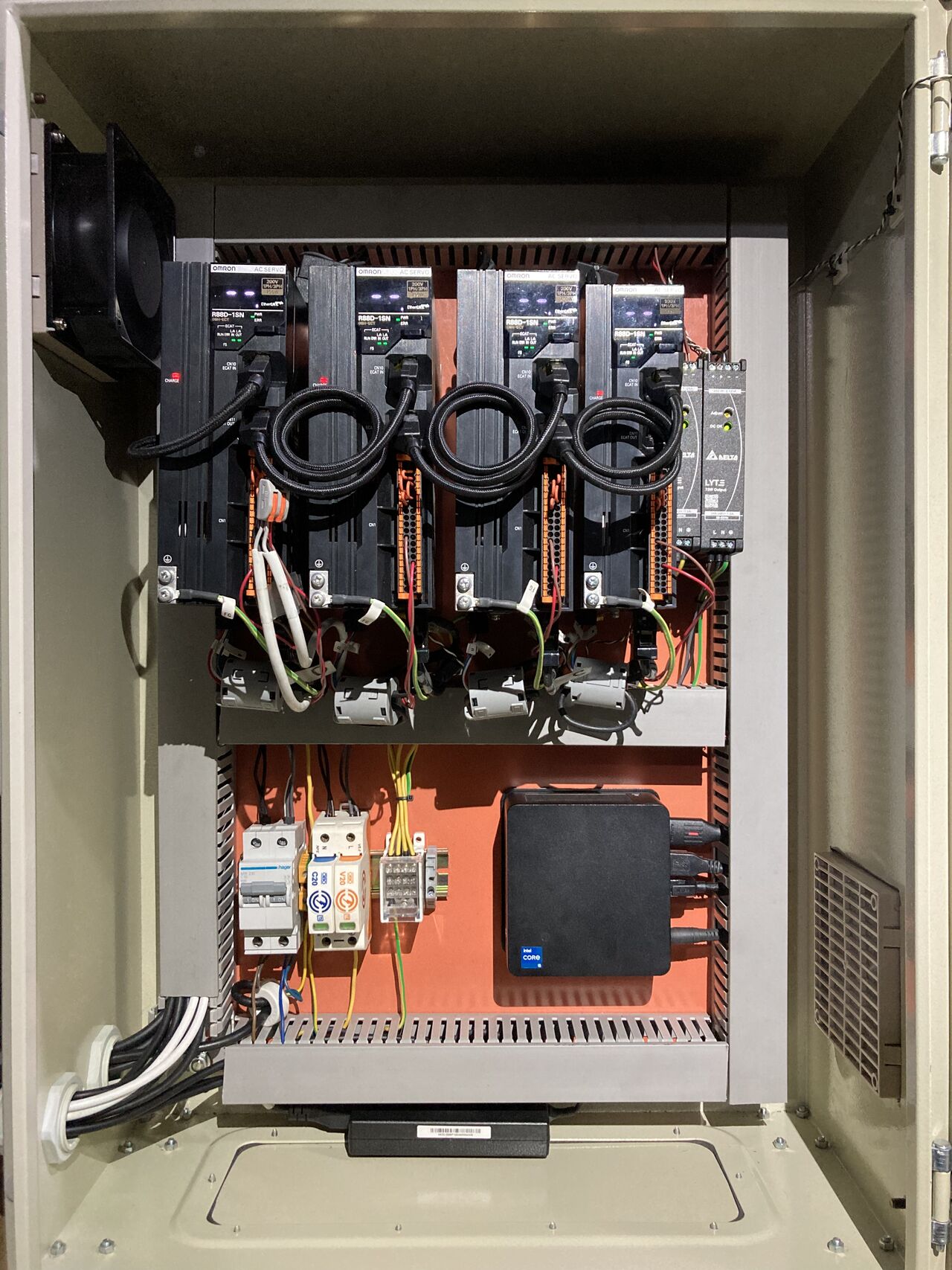
Open the door on the control panel that drives our Delta robot and there is surprisingly little inside. Four Omron EtherCAT servo drives. One Intel mini PC with a 12th-generation Intel i5 CPU and 12 physical cores. That is the motion system, and it runs the robot’s kinematics at 4000 Hz.
This post walks through what each piece does, and why a commodity PC connected over EtherCAT can do work that used to need a dedicated, proprietary motion controller.
The servo drives
A Delta robot is a parallel-kinematic machine: three arms meet at a single moving platform, and an optional fourth axis adds rotation at the tool. Our Delta Robot is specified as 3 degrees of freedom plus an optional rotary axis, so the panel carries four servo drives, one per axis.
The drives are Omron EtherCAT servo drives. Each one is an EtherCAT slave on the same network as the PC. What they need from the master is a fresh target position every cycle, delivered on time.
The brain: a mini PC
All of the robot’s intelligence lives on one Intel mini PC with a 12th-generation Core i5 and 12 physical cores. It runs two Adeeb software layers:
- Adeeb Robot Controller: the kinematics, trajectory planning, and conveyor tracking for the robot.
- Adeeb EtherCAT Master: the real-time stack that moves process data between the PC and the four drives every cycle.
The core count matters. As we covered in our Robot Controller on Windows walkthrough, the controller also runs AI vision workloads that are computationally expensive. A 12-core machine leaves room for vision and the rest of the application without taking time away from the real-time motion loop.
What 4000 Hz means
A rate of 4000 Hz is a 250 µs cycle. Every 250 microseconds the controller solves the robot’s kinematics, converting where the tool should be into a target position for each of the four motors. The EtherCAT Master then sends those targets to the drives and reads back their actual positions.
250 µs is also the minimum cycle time of the Adeeb EtherCAT Master. The EtherCAT Master C API documentation is specific about what that takes: the full 4000 Hz rate is supported only on PCs running Linux with an Intel Ethernet adapter that uses the igc driver, such as the I225 and I226 families. For those adapters, the master includes an optimized user-space real-time Ethernet driver. That is a big part of why an Intel mini PC fits this panel: it is off-the-shelf hardware, and its network interface is one the master is tuned for.
Why commodity PC + EtherCAT works
Traditionally, high-speed robot motion has meant a closed controller box tied to one robot vendor. A commodity PC with EtherCAT works for three reasons.
EtherCAT handles the timing. EtherCAT processes data on the fly: one frame passes through every drive on the network each cycle, with each drive reading and writing its own data as the frame goes by. Distributed clocks (IEEE 1588) keep the drives synchronized to a shared time reference. The PC does not have to talk to each axis separately. It has to hit one deadline per cycle.
The determinism comes from software. On standard Ethernet hardware, the hard part is guaranteeing that frames go out on time. That is the job of the real-time driver and the EtherCAT Master, not specialized silicon.
The compute is cheap and plentiful. A modern multi-core x86 CPU leaves headroom beyond the motion loop. The spare cores go to vision, conveyor tracking, and the rest of the application.
The result is a panel with fewer components, built from parts you can source anywhere, running software you can program directly. The Robot Controller is driven through a Python interface.
One panel, more than one robot
The same architecture is not limited to Delta robots. Our Robot Electrical Panel comes pre-wired for the Adeeb Delta Robot and is also compatible with 6- and 7-axis robots. The Robot Controller supports 6/7-axis arms, palletizers, SCARA, and Delta robots. Changing the robot type is a matter of the drive count and the kinematic model, not a new control platform.
See the hardware for yourself
If you are speccing a pick-and-place cell or want to replace a proprietary motion controller with an open, PC-based one, start with the Robot Electrical Panel page. To see the panel driving a robot, book a demo. To talk through your application, contact our team.